Grow Smarter
With the Right CRM.
Stop losing leads in spreadsheets and sticky notes. Our all-in-one CRM tracks every customer interaction, automates follow-ups, and gives your team the tools to grow without the chaos.


Websites

Local SEO

AI Chat

Appointments

Lead Funnels

Automation
CRM
CRM vs Multiple Tools for Small Business
Every plan includes setup, optimization, AI support, and unlimited updates. No contracts. Cancel anytime.

A missed call at 2:17 p.m. should not turn into a lost $4,000 job. But that is exactly what happens when your scheduler, inbox, texting platform, forms, and customer database all live in different places. The real issue in the crm vs multiple tools debate is not software preference. It is whether your business can respond fast enough, track every lead, and turn interest into booked revenue without your team playing catch-up all day.
For local service businesses, disconnected systems create expensive blind spots. A lead comes in from your website, gets forwarded to email, maybe lands in a spreadsheet, and hopefully someone remembers to call back. That is not a growth system. That is a gamble.
CRM vs Multiple Tools: What are you really choosing?
Most owners think they are choosing between flexibility and simplicity. That is only part of the picture. What you are really choosing is where your business will pay the price.
With multiple tools, the appeal is obvious. You can pick a separate app for email, another for scheduling, another for estimates, another for texting, and another for pipeline management. On paper, that sounds customized. In practice, it often means your data is scattered, your staff is jumping between tabs, and your follow-up depends on manual work.
A CRM, especially one built as a central operating system, changes that equation. Instead of asking your team to stitch together six platforms, it keeps your contacts, conversations, appointments, lead sources, and automation in one place. That matters because speed wins in local service markets. The first company to answer, follow up, and book usually gets the job.
The trade-off is real, though. Not every all-in-one platform is equally strong in every feature. Some specialty tools may go deeper in one area. If you have a large team with unusual workflows, there are cases where a mixed stack makes sense. But most small businesses are not suffering from a lack of advanced features. They are suffering from operational drag.
Why multiple tools start cheap and end expensive
A lot of owners build their tech stack one problem at a time. First they add a calendar tool. Then an email platform. Then a chatbot. Then call tracking. Then review management. Then a CRM. Each subscription feels manageable by itself.
The problem shows up later. Now your office manager has to check several dashboards. Your leads are duplicated or missing details. Your automations break when one app updates. Your reporting is unreliable because each tool measures something different. You spend money not just on software, but on the labor required to keep the software working together.
That is the hidden cost of fragmentation. The monthly price is only part of it. The real cost is slower response times, dropped leads, inconsistent customer communication, and staff time burned on admin instead of production.
If you are an HVAC company, plumber, roofer, or bookkeeper, this matters more than most software vendors admit. Your business does not run on neat office hours. Leads come in while you are on a job, driving between appointments, or dealing with a customer issue. If your systems cannot automatically capture, organize, and follow up, you are not just inefficient. You are leaking revenue.
Where a CRM pulls ahead
A CRM earns its keep when it becomes the command center for your sales and communication process.
Think about what happens when a homeowner fills out a quote form. In a strong CRM setup, that lead is instantly stored, tagged by source, assigned to the right pipeline, triggered into a text or email follow-up, and connected to a booking calendar. If they do not answer the first call, the system can keep working in the background instead of relying on someone to remember the next step.
That is not about convenience. It is about conversion.
A centralized CRM also gives you visibility. You can see where leads came from, how quickly your team responded, which campaigns produced booked jobs, and where deals are stalling. With multiple disconnected tools, those answers are often partial or delayed. You may know how many form submissions you got, but not how many turned into revenue. You may know how many calls came in, but not how many were missed and never recovered.
When the system is connected, decisions get sharper. You stop guessing which marketing channel is working. You stop wondering whether the office is following up. You can actually manage the pipeline like a CEO instead of reacting like a firefighter.
The revenue impact is usually in the follow-up
Most local businesses do not lose because they lack demand. They lose because they do not have consistent follow-up.
A stand-alone scheduler cannot manage a lead pipeline. An email platform cannot recover a missed call. A texting app alone cannot show whether a lead ever booked. This is where the crm vs multiple tools decision becomes practical, not theoretical. If your tools do not talk to each other, your customer journey breaks in the handoff.
A CRM with automation closes those handoff gaps. It can confirm appointments, send reminders, trigger estimate follow-ups, request reviews, and re-engage old leads. Those are the small actions that drive large gains over time.
When multiple tools still make sense
There are situations where multiple tools are not the wrong move.
If your business has a highly specialized process and a tool that clearly outperforms everything else in that one area, keeping it can be smart. If you already have a well-managed tech stack, in-house operations support, and clean integrations, you may not feel the pain as sharply. Some larger companies can afford complexity because they have staff dedicated to managing systems.
But that is the key phrase - they can afford complexity.
Most small and midsize service businesses cannot. If the owner is still involved in estimates, field work, hiring, and customer issues, adding more software usually adds more friction. The stack may look sophisticated, but if nobody fully uses it, it is just expensive clutter.
The better question is not whether multiple tools can work. Of course they can. The question is whether they help your team move faster and close more business with less effort. If the answer is no, the setup is costing you more than it is saving.
How to decide what your business actually needs
Start with the customer path, not the software list.
Ask yourself what happens from the moment a lead finds you to the moment they become a paying customer. Where do calls go? How are forms captured? Who follows up? How are appointments booked? What happens when nobody answers? How do you track estimates, closed jobs, and repeat business?
If your answer includes too many phrases like "we manually," "we try to," or "someone usually handles that," your systems are weak.
A healthy setup should do three things well. It should capture every lead, trigger fast follow-up, and give you one clear place to track the outcome. If you need five apps and a spreadsheet to make that happen, the foundation is shaky.
This is why more service businesses are moving toward integrated platforms. They do not want another app. They want fewer points of failure. They want one system that supports lead generation, communication, booking, nurture, and visibility without forcing the team to glue everything together.
For Detroit-area contractors and local operators trying to grow, that matters. Competition is tighter, response speed matters more, and customers expect immediate answers. A fragmented setup is hard enough when business is slow. When lead volume increases, it gets exposed fast.
The smart move is the one that reduces friction
Software should create momentum. If it creates confusion, duplicate work, or delayed follow-up, it is working against your growth.
That is why the crm vs multiple tools conversation should always come back to results. Are you booking more jobs? Are you recovering missed calls? Are you reducing admin time? Are you giving your team a system they will actually use? Those are the metrics that matter.
A lot of businesses hold onto multiple tools because they are used to them, not because they are effective. Familiar does not mean efficient. And patching together software is not the same as building an operating system for growth.
For many small businesses, the strongest move is to centralize the essentials, automate the repeatable tasks, and make customer communication easier to manage. That is where an integrated CRM setup creates an edge. It cuts the lag between inquiry and response. It reduces human error. It gives owners better control over marketing and sales performance.
Vertex Growth works with businesses facing exactly this problem - too many tools, not enough follow-through, and too much revenue left on the table because the system is broken between lead capture and close.
If your stack feels busy but your pipeline still feels unpredictable, that is your answer. The best system is not the one with the most apps. It is the one that helps your business respond faster, operate cleaner, and grow without adding chaos.
Best CRM for Residential Contractors

A missed call at 4:47 p.m. can turn into a lost kitchen remodel, roofing estimate, or bathroom renovation by 5:15. That is exactly why a strong CRM for residential contractors is no longer optional. If your team is still juggling sticky notes, spreadsheets, call logs, and scattered texts, you are not running a system. You are gambling with revenue.
Most residential contractors do not have a lead problem. They have a follow-up problem, a scheduling problem, or a visibility problem between the first call and the signed job. The right CRM fixes that by putting your leads, customer conversations, estimates, appointments, and automations in one place so your business stops leaking money.
What a CRM for residential contractors actually needs to do
A generic CRM might look fine in a demo, but residential work has its own rhythm. Homeowners call after work, ask for quotes on weekends, compare three companies at once, and expect fast answers. If your system cannot keep up with that buying behavior, it will not help much.
A useful CRM for residential contractors should capture leads from your website, forms, ads, phone calls, and referrals without forcing your office staff to re-enter everything by hand. It should also show where every lead came from so you know whether your SEO, Google Business Profile, paid ads, or referral network is producing real jobs instead of just activity.
Then there is speed. The first contractor to respond often wins the estimate. That means your CRM should trigger an immediate text, email, or call-back workflow the second a lead comes in. If someone calls after hours, the system should still acknowledge them, collect details, and push the lead into your pipeline for follow-up first thing in the morning.
It also needs to support the full customer journey, not just the first contact. Residential contractors need a way to track estimates sent, appointments booked, jobs won, jobs lost, and follow-ups for reviews or future services. If your CRM stops at contact storage, it is too shallow.
Why disconnected tools cost contractors more than they think
A lot of contractors are running five to eight separate tools without realizing how much that setup is slowing them down. One tool handles forms, another handles email, another handles scheduling, another handles texting, and then customer information sits in a CRM that never tells the whole story.
That kind of stack creates delays and blind spots. Your office manager has to bounce between tabs. Your estimator does not know a customer already replied to a text. Your receptionist books an appointment without seeing the lead source or campaign. Nobody has a clean picture of what is happening.
The cost is not just software subscriptions. It is the lost lead that never got called back, the appointment that got double-booked, and the estimate that went cold because no one followed up three days later. For a residential contractor, that is real money.
This is why integrated systems are gaining ground. When your website, lead capture, booking calendar, SMS, email, missed-call response, and CRM live in one environment, your team moves faster and makes fewer mistakes. That matters even more for smaller shops trying to grow without hiring a large admin team.
The best CRM for residential contractors is built around speed
Most contractors think about CRM as organization. That matters, but speed is what closes jobs.
If a homeowner fills out a quote form at 8:22 p.m., your system should respond at 8:22 p.m., not the next morning when they have already contacted two competitors. If a call gets missed during a jobsite visit, the CRM should fire off a text that says your office will follow up shortly. If an estimate gets sent and no one replies, the CRM should remind the customer before the opportunity dies.
This is where automation stops being a nice extra and becomes a competitive advantage. Fast follow-up makes your business look larger, sharper, and more reliable. Homeowners do not always choose the cheapest contractor. They often choose the one who communicates clearly and quickly.
For many local businesses, that is the easiest win on the board. You do not need more leads if you are still dropping the ones you already paid to generate.
Key features that matter most
The best CRM for residential contractors usually includes a few non-negotiables. First is lead capture from every channel, including calls, web forms, texts, and ad campaigns. Second is pipeline tracking, so you can see exactly how many leads are new, scheduled, estimated, won, or dead.
Third is appointment booking. Homeowners do not want a long back-and-forth just to find a time. If your CRM includes booking calendars and reminders, you reduce no-shows and cut admin time. Fourth is automated follow-up by text and email. That keeps leads warm without requiring your staff to remember every step.
Fifth is reputation management. In residential services, reviews drive trust and local rankings. A CRM that automatically asks happy customers for reviews after the job can create a steady stream of fresh social proof. Sixth is reporting. You need to know cost per lead, lead source, close rate, and response speed if you want to grow like a CEO instead of guessing like an overwhelmed operator.
There are also useful extras depending on your business model. If you run a high volume of inbound calls, missed-call text back and AI receptionist tools can make a major difference. If your sales process depends on estimates and reminders, stronger automation matters more than fancy contact fields.
When a simple CRM is enough and when it is not
Not every contractor needs the most advanced setup on day one. If you are a solo operator with a steady referral base and low lead volume, a simple CRM may be enough for now as long as it centralizes contacts, tracks estimates, and keeps follow-up from slipping.
But if you are investing in SEO, Google ads, local service ads, direct mail, or a higher-performing website, simple breaks down fast. The minute you start generating more leads, weak systems create chaos. You cannot scale with a scattered process.
That is the real trade-off. A lighter CRM may cost less up front, but it often creates more manual work and more missed opportunities. A more integrated platform may feel like a bigger step, yet it can replace multiple subscriptions and remove the bottlenecks that hold growth back.
For residential contractors in competitive markets like Detroit, Taylor, and the surrounding Michigan area, that difference shows up quickly. The company with better response time and tighter follow-up usually wins more of the same leads.
How to choose a CRM for residential contractors without wasting months
Start with your actual workflow, not a feature checklist. Look at how a lead enters your business, how quickly someone responds, how estimates get scheduled, how reminders are sent, and what happens after the job. The right CRM should improve those exact moments.
Ask a harder question than “Does it have CRM features?” Ask whether it reduces missed calls, shortens response time, automates repetitive follow-up, and gives you clear visibility into revenue. If it does not move those numbers, it is probably just another dashboard.
It also helps to think in terms of consolidation. If one platform can handle your website forms, booking, text automation, reviews, and pipeline management, that can be a smarter move than buying separate tools and hoping they cooperate. That all-in-one model is especially valuable for contractors who want fewer logins and fewer points of failure.
This is where companies like Vertex Growth LLC have a practical advantage for local service businesses. Instead of selling software in a vacuum, they combine marketing systems, automation, AI-powered follow-up, and CRM functionality around the real way contractors operate. That approach makes more sense when your goal is not just storing contacts, but turning more leads into booked jobs.
CRM is not admin software - it is a revenue system
That mindset shift matters. A lot of contractors treat CRM like office software, something that keeps records tidy. The better way to see it is as a revenue system. It helps you capture demand, respond faster, stay organized through the sales process, and create repeatable growth.
If your current setup depends on memory, paper notes, or one employee holding everything together, you do not have a durable business system. You have a vulnerability. A real CRM brings structure to lead flow, sales activity, and customer communication so the business can keep moving even when the day gets hectic.
And residential contracting always gets hectic. Phones ring during site visits. Homeowners text after hours. Estimates pile up. Reviews get forgotten. That is normal. The point of CRM is not to create a perfect world. It is to make sure normal chaos does not kill profitable opportunities.
The contractors who grow fastest are usually not doing magic. They are just running tighter systems than everyone else. If your business is ready to stop chasing leads manually and start converting them with speed, consistency, and automation, the right CRM is one of the smartest upgrades you can make.
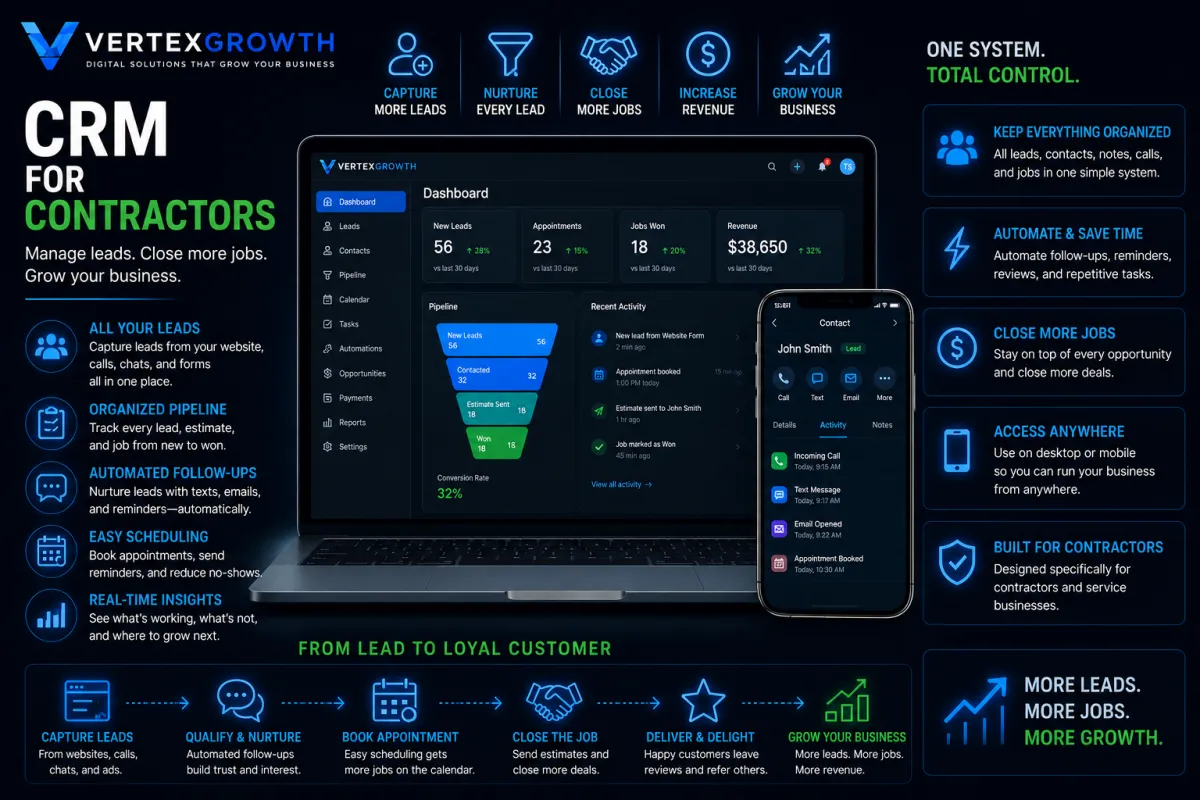
CRM
Your Business Never Stops.
Neither Does Your CRM.
Keep every lead, estimate, appointment, and customer conversation organized in one place. Our contractor CRM helps you respond faster, close more jobs, and manage your business with confidence.
Keep Everything Organized
Grow Your Business
Easy Scheduling
From Lead to Loyal Customer
Access Anywhere
Close More Jobs
Helping Local Businesses Grow Every Day




What Our Clients Are Saying
Frequently Asked Questions
Do I have to sign a contract?
No. Every plan is month-to-month and you can cancel anytime.
How long does it take to build my website?
Most websites are completed within 7–14 business days.
Does the AI Receptionist answer calls?
Yes. It answers calls, texts, website chats, qualifies leads, and books appointments.
Can I keep my existing website?
Absolutely. We can improve your current website or build a completely new one.
Will my business show up on Google?
Yes. Every plan includes Google Business Profile optimization and Local SEO.
Do you provide support?
Yes. We provide ongoing updates, maintenance, hosting, and technical support.
Can I upgrade later?
Absolutely. You can upgrade to Rapid Growth or Accelerated Growth at any time.